Enhance Your Web Design with Taptalks Script Font
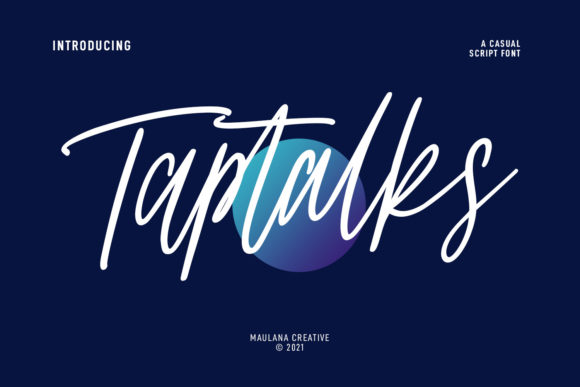
Taptalks Script is a slanted casual script font that brings a unique, fun, and natural feel to any digital project. With its light contrast stroke and playful characters, this typeface is perfect for adding a touch of personality to your web designs, social media graphics, and more.
Visual Characteristics and Personality
Taptalks Script features a relaxed, handwritten style with smooth, flowing lines and natural ligatures. This makes it ideal for creating a friendly and approachable brand tone. The font's light contrast adds a subtle elegance, making it versatile for both casual and more refined projects.
Perfect for Creative and Engaging Web Designs
When it comes to web design, Taptalks Script can be a powerful tool in your creative arsenal. Here’s how you can use it effectively:
- Website Headers and Hero Sections: Use Taptalks Script for the main title or tagline in your website headers and hero sections. Its distinctive style will grab attention and set the tone for the rest of the page.
- Landing Pages and Call-to-Action Areas: Incorporate Taptalks Script for short, impactful phrases in your call-to-action areas. This can help create a memorable and engaging experience for your visitors.
- Online Shop Banners and Product Highlights: Add a touch of creativity to your online shop banners and product highlights with Taptalks Script. It can make your products stand out and add a personal, handcrafted feel.
- Blog Graphics and Social Media Posts: Use Taptalks Script for blog post titles and social media graphics to create a consistent and visually appealing brand identity across all platforms.
Readability and Visual Hierarchy
While Taptalks Script is visually appealing, it’s important to consider readability and visual hierarchy. Here are some tips to ensure your content remains clear and easy to read:
- Use for Short Phrases: Taptalks Script works best for short, punchy text like headlines, subheadings, and callouts. Avoid using it for long paragraphs or body text, where a simpler sans serif or serif font would be more legible.
- Contrast and Backgrounds: Ensure there is enough contrast between the font color and the background. For dark backgrounds, use a lighter font color, and vice versa. This helps maintain readability, especially on mobile screens.
- Responsive Layouts: Test Taptalks Script on different devices and screen sizes to ensure it scales well. Adjust the font size and line height as needed to maintain clarity and impact.
Font Pairing for a Cohesive Brand Identity
To create a balanced and professional look, pair Taptalks Script with a clean, simple sans serif font for body text. This combination ensures that your content is both visually appealing and easy to read. For example, you might use Taptalks Script for the main headings and a sans serif like Arial or Helvetica for the body text.
Practical Considerations for Digital Use
When using Taptalks Script in your digital projects, keep the following in mind:
- Webfont Availability: Check if Taptalks Script is available as a webfont. This ensures that the font loads correctly across different browsers and devices.
- File Formats and Styles: Make sure you have access to the necessary file formats (e.e., .ttf, .otf, .woff) and styles (e.g., regular, bold, italic) for your project. This flexibility allows you to use the font in various contexts.
- Multilingual Support: If your audience includes speakers of multiple languages, verify that Taptalks Script supports the necessary character sets.
- Commercial Licensing: Ensure you have the appropriate commercial license for using Taptalks Script in client projects, online stores, and other commercial applications. This is crucial to avoid any legal issues.
Real-World Applications
Here are some practical examples of how Taptalks Script can be used in different digital projects:
- Creative Portfolio Sites: Use Taptalks Script for the main heading and section titles to give your portfolio a personal and artistic touch.
- Boutique Online Stores: Incorporate Taptalks Script in your product descriptions and promotional banners to create a unique and inviting shopping experience.
- Coaching Websites: Add Taptalks Script to your service pages and testimonials to convey a warm and trustworthy brand image.
- Product Landing Pages: Use Taptalks Script for the main headline and key benefits to make your landing page more engaging and persuasive.
- Blog Headers and Social Media Graphics: Apply Taptalks Script to your blog post titles and social media graphics to create a cohesive and visually appealing brand presence.
By thoughtfully integrating Taptalks Script into your web designs, you can enhance the visual appeal, readability, and overall user experience of your digital projects. Whether you’re working on a creative portfolio, an online store, or a coaching website, Taptalks Script offers a versatile and stylish solution for your typography needs.