Enhancing Web Design with Delimora Script Font
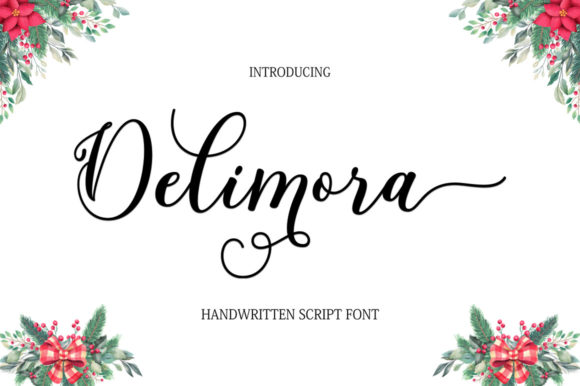
As I was designing the homepage for a boutique online store, I stumbled upon Delimora Script, a modern and elegant typeface that immediately caught my eye. This fresh, handmade calligraphy-style font, with its decorative characters and dancing baseline, seemed perfect for adding a touch of sophistication and charm to the site.
A First Look at Delimora Script
Delimora Script is not just any script font; it's a premium typeface that exudes a unique, handcrafted feel. The flowing, cursive style of the letters gives a sense of movement and elegance, making it ideal for creating a memorable first impression. The font's personality is both modern and classic, blending seamlessly into contemporary web design while maintaining a timeless appeal.
Testing Delimora Script in the Hero Section
I decided to test Delimora Script in the hero section of the boutique's homepage. Placing it over a high-quality image banner, the font's decorative characters and fluid lines complemented the visual elements beautifully. The result was a visually striking and inviting opening that set the tone for the entire website.
Readability and Visual Hierarchy
While Delimora Script is visually stunning, it's important to consider readability, especially on smaller screens. For the mobile layout, I used the font for the main headline but opted for a clean, sans serif font for the subheadings and body text. This combination ensured that the key messages were clear and easy to read, while still maintaining the overall aesthetic.
Using Delimora Script in Different Web Elements
- Headers and Headlines: Perfect for main titles and headlines, where its decorative style can make a bold statement.
- Call-to-Action Areas: Use it for short, impactful phrases like "Shop Now" or "Learn More" to draw attention and encourage action.
- Logo Text: Its unique style makes it an excellent choice for logo designs, adding a personal and professional touch.
- Decorative Accents: Ideal for adding flair to banners, promotional graphics, and other creative elements.
Font Pairing for Web Design
To create a balanced and cohesive design, I paired Delimora Script with a simple sans serif font, such as Arial or Helvetica, for the body text. This combination provided a good contrast, making the content more readable and the overall design more polished. For a more editorial look, I also experimented with a serif font, which added a touch of sophistication and traditional elegance.
Practical Tips for Using Delimora Script
- Check Readability: Test the font on different devices and screen sizes to ensure it remains legible and visually appealing.
- Consider Backgrounds: Use Delimora Script on both light and dark backgrounds, but always ensure there is enough contrast for readability.
- Use for Short Phrases: While the font is beautiful, it's best used for short, impactful text rather than long paragraphs.
- Webfont Availability: Make sure to check if the font is available as a webfont and includes the necessary file formats (e.e., WOFF, WOFF2) for optimal performance.
- Commercial Licensing: Verify that the font license allows for commercial use, especially if you are using it for client projects or online stores.
Conclusion: A Versatile and Elegant Choice
Incorporating Delimora Script into the boutique's website transformed the overall user experience, making it more engaging and visually appealing. Whether used in headers, call-to-action areas, or as a decorative accent, this font adds a unique and sophisticated touch to any digital project. By carefully considering readability, font pairing, and practical usage, Delimora Script can be a valuable asset in your web design toolkit.